
It's understandable that mistakes can happen, and it’s possible you may have checked out the wrong tenant in your EasyRenz account.
However, once a tenant is marked as "Checked Out" on EasyRenz, this action is permanent and cannot be undone.
Don’t worry, though! Follow these steps to add the tenant back into EasyRenz:
Step 1: Create a new booking for the tenant, including the unit's deposit bills.
Detailed Step: [Bookings & Rentals] How To Add New Booking ?
Step 2: Check in the tenant.
Detailed Step: [Bookings & Rentals] How To Check In A Rental ?
Step 3: Deposit Transfer the paid deposits from the previous rental to the new rental.
Detailed Step: [Deposit Refunds] How To Create Deposit Refund / Deposit Transfer ?
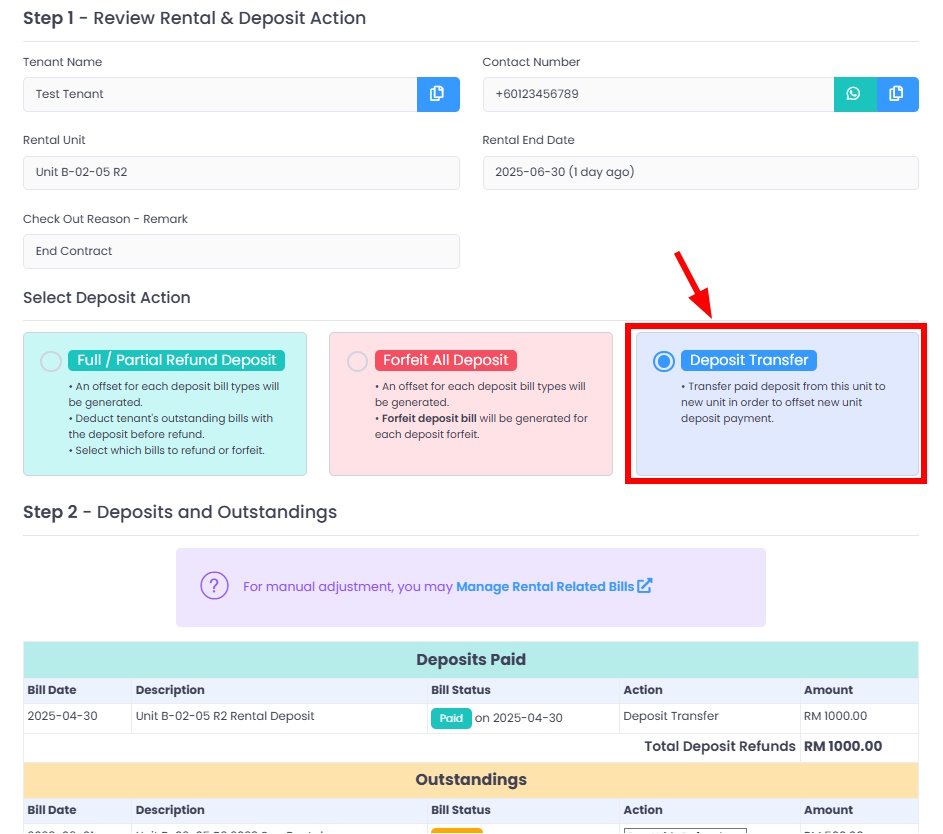
The Deposit Transfer option is only available if the tenant has an active New Booking or Rental in your account.
If you have not yet created a new booking or rental for the tenant, please do so before attempting to perform a deposit transfer.
Step 4: Manually record the deposit payments for the new rental, by using the transferred deposit bills (in negative amount) from previous rental to offset the new rental's deposit bills.
Detailed Step: [Bills, Invoices & Receipts] How To Manually Record Payment ?
Step 5 (Optional): If your rental is linked to TMS Prepaid Mode smart meters, inform the tenant that the previous rental’s meter balance has been refunded (as an overpayment negative bill), which can be used to offset future bills. The tenant will need to top up their meter balance to avoid electricity disruption due to insufficient funds on the new rental account.
Learn More: [Smart Meters - TMS Prepaid] How To Manually Topup / Adjust TMS Prepaid Meter Balance ?