
Manually Record Payment
Recording payments manually in EasyRenz ensures that all transactions are accurately tracked, even if the payment was made outside the system (e.g., cash, bank transfer and cheque). Here’s how you can manually record the payments:
Step 1 : Go to Record Payment page. There are two ways to access the page:
1. Go to Accounting > Bill > Go to Action Tab and Click '$' icon
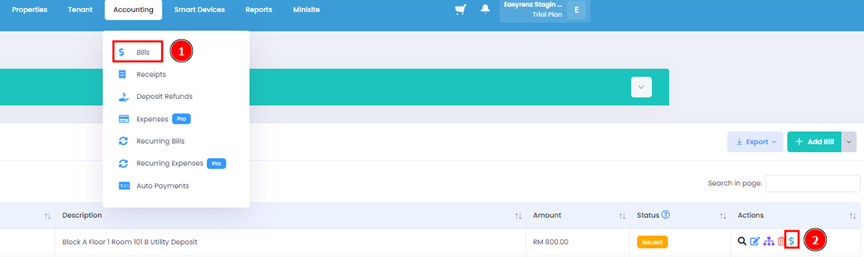
2. Go to Tenant > Active Tenants > Under Outstanding, click Record Payment

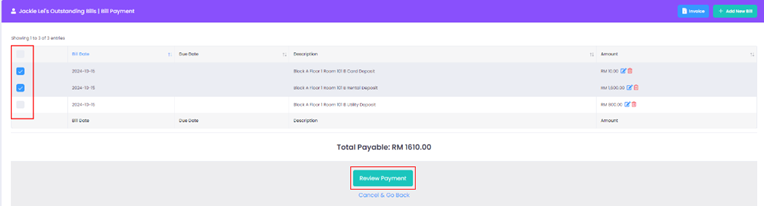
Step 2 : Select the bill that has been manually paid and click on Review Payment.
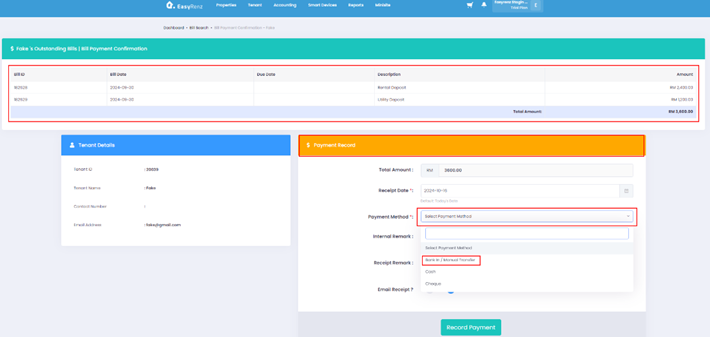
Step 3 : Review the selected bills > Payment Record > Payment Method > Record Payment
Getting Started - Next Topic
Check in a tenant - [Bookings & Rentals] How To Check In A Rental ?