
TMS Mode
TMS Mode is activated when the smart meter is linked to a unit and managed through our rental automation system. In this mode:
The meter is connected to the system and allows for automated management.
Tenants can create an account and view their kWh usage through the mobile app.
Usage is monitored and managed within the rental automation system.
Manual Mode
Manual Mode is the default mode for a smart meter that is not linked to any unit or the rental automation system. In this mode:
There are no connections to the system, and the meter operates independently.
There are no usage limits for devices or tenants, and the system is free to use without restrictions.
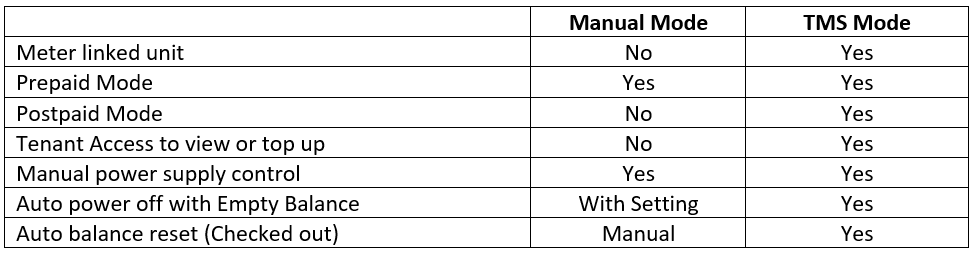
Summary on TMS Mode and Manual Mode
Related Questions
[Smart Meters - General] How To Change Between TMS Mode And Manual Mode ?