
You can only sign up for Payex through the EasyRenz Web version.
You should NOT registering Payex on their official website, as accounts registered there cannot be integrated with EasyRenz.
Steps to sign up for Payex (payment gateway).
Step 1: Click on Profile > Click on Account Settings > under Payment Gateway & Auto Pay > Register Payex Partner.
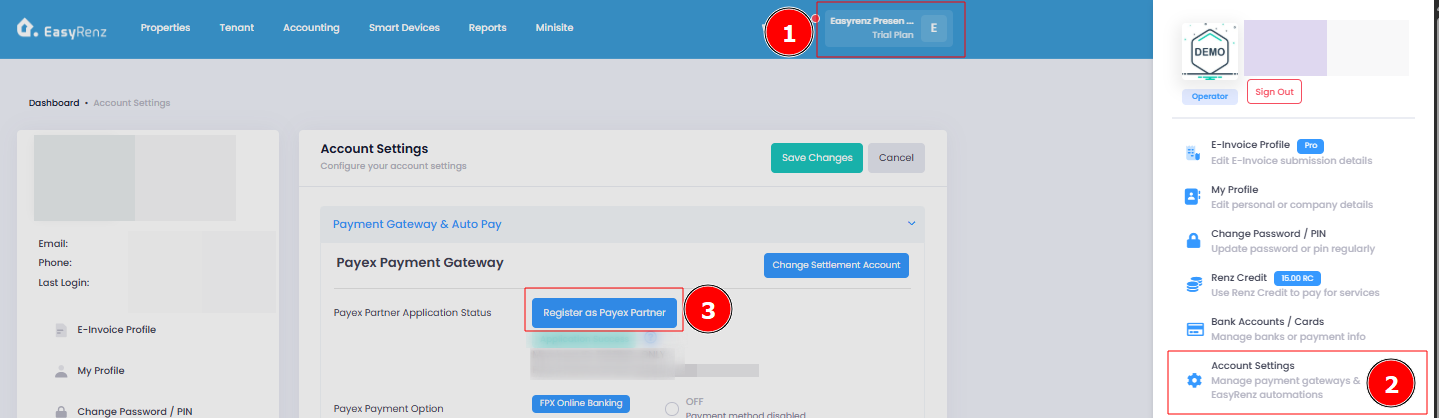
Step 3: Follow the on-screen instruction to complete your Payex application.
1. Please use an email address that has not been previously registered with Payex to sign up.
2. You may use an email address different from your EasyRenz account to sign up for Payex.
Your application will be reviewed within 2-5 working days.
Once your application has been approved by Payex, you will receive an email from Payex.
Once your Payex account is integrated with EasyRenz, you will receive a push notification notifying you that Payex is ready to use.
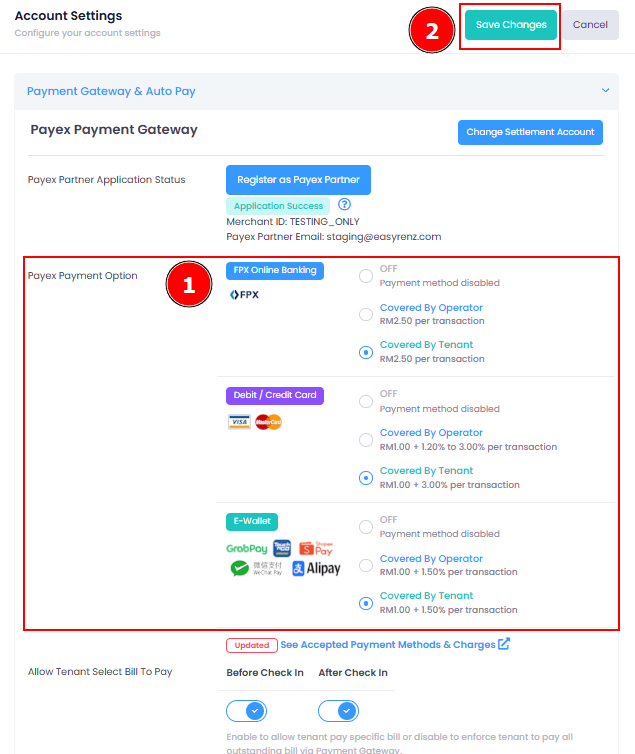
Step 4: Once your application is successful, you can enable and select your preferred Payex payment option. Tenants will then be able to use the selected payment method in the EasyRenz app to make payments to management. Be sure to save any changes after making updates.
Getting Started - Next Topic
Create a new property and units - [Properties & Units] How To Add New Property & Units ?